> ## Documentation Index
> Fetch the complete documentation index at: https://docs.orbitrage.ai/llms.txt
> Use this file to discover all available pages before exploring further.
# Tools Gateway
> Reference a tool by name and Orbitrage runs it server-side with our keys — no tool API keys to manage. You pay per call.
The Tools Gateway is BYOK's mirror image. [BYOK](/concepts/byok) puts frontier *model*
keys in your hands; this takes **tool** keys out of them. Reference a reserved tool name
(like `tavily_orbitrage`) in your normal `tools=[…]` array — Orbitrage runs it with our
pooled key, feeds the result back to the model, and returns the final answer. You pay
per call (provider price + the standard 2.5% platform fee). Your own tools always run
on your side, untouched.
## How it works
On the [Tools Gateway page](https://app.orbitrage.ai/tools-gateway), turn the
feature on and check the managed tools you want to allow.
Add the reserved name to your request's `tools` array — in pure OpenAI format.
No key, no setup.
When the model calls a managed tool, Orbitrage executes it (with our key), appends
the result, and re-invokes the model until it produces a final answer — all in one
request. We bill the call to your credit balance.
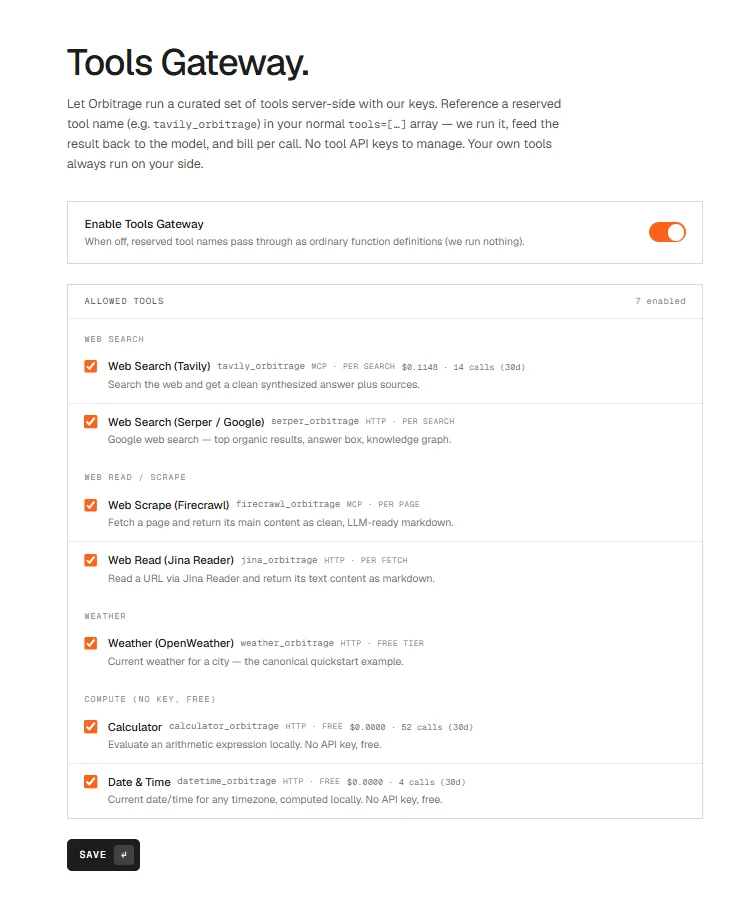 ## Available tools
| Tool name | What it does | Runs via |
| -------------------------- | ----------------------------------------------------------- | ------------- |
| `tavily_orbitrage` | Web search with a synthesized answer + sources | Tavily MCP |
| `serper_orbitrage` | Google web search (organic results, answer box) | Serper |
| `firecrawl_orbitrage` | Scrape a page → clean LLM-ready markdown | Firecrawl MCP |
| `jina_orbitrage` | Read a URL → markdown text | Jina Reader |
| `screenshot_orbitrage` | Screenshot any public web page → PNG image URL | Orbitrage |
| `weather_orbitrage` | Current weather for a city | OpenWeather |
| `calculator_orbitrage` | Evaluate an arithmetic expression (local, free) | Orbitrage |
| `datetime_orbitrage` | Current date/time for any timezone (local, free) | Orbitrage |
| `exa_search_orbitrage` | Neural web search — results **with** extracted page text | Exa |
| `image_gen_orbitrage` | Generate image(s) from a prompt → image URL(s) | MiniMax |
| `music_gen_orbitrage` | Generate a song (vocal/instrumental) → audio URL | MiniMax |
| `onchain_wallet_orbitrage` | Token holdings of any EVM wallet (value, chain, 24h) | Zerion |
| `monid_find_orbitrage` | Discover a tool from the full catalog by description (free) | Catalog |
| `monid_run_orbitrage` | Run **any** catalog tool by provider + endpoint | Catalog |
Rich tools (Tavily, Firecrawl) run through the vendor's hosted **MCP server** with our
key injected — so the model's tool calls are executed and billed by us, and it works for
every model you route to, not just MCP-aware ones. Your key never leaves our backend.
### The whole tool catalog, by name
Beyond the named tools above, `monid_find_orbitrage` + `monid_run_orbitrage` reach a
catalog of **\~1,300 third-party tools** (web search, scraping, people/company data, media
generation, on-chain, weather, news, and more) — all executed with Orbitrage's pooled
account, no signup or keys on your side. The model discovers the right tool by description
(`monid_find_orbitrage`) then runs it (`monid_run_orbitrage`) — long-running tools are
polled to completion transparently. These are **metered**: you're billed the tool's
**actual** per-call cost (which varies per tool) plus the standard markup — nothing when a
tool completes but returns no data. A per-call cost ceiling protects against runaway spend.
## Usage
Just list the tool name — Orbitrage expands it to the full definition for you. This is the
whole point: zero boilerplate.
```python Python theme={null}
import os, orbitrage
orbitrage.init(os.environ["ORBITRAGE_API_KEY"], user_id="customer_42")
from openai import OpenAI
client = OpenAI()
resp = client.chat.completions.create(
model="minimax-m3", # pin a model for tools (see tip below)
messages=[{"role": "user", "content": "What's the latest on the Model Context Protocol? Cite sources."}],
tools=["tavily_orbitrage"], # ← that's it
)
print(resp.choices[0].message.content)
```
```typescript Node theme={null}
import { orbitrage } from "orbitrage";
await orbitrage.init({ apiKey: process.env.ORBITRAGE_API_KEY, userId: "customer_42" });
import OpenAI from "openai";
const client = new OpenAI();
const resp = await client.chat.completions.create({
model: "minimax-m3", // pin a model for tools (see tip below)
messages: [{ role: "user", content: "What's the latest on the Model Context Protocol? Cite sources." }],
tools: ["tavily_orbitrage"], // ← that's it
});
console.log(resp.choices[0].message.content);
```
**Pin a model for tool-heavy calls.** `glm-5.2`, `minimax-m3`, and
`gpt-oss-20b` all run managed tools reliably. `model="auto"` can route to a
small reasoning model that truncates before emitting the tool call — use a
direct model (or set `max_tokens` ≥ 512) when tools matter.
The SDK doesn't matter — Orbitrage works through any OpenAI-compatible client because the
gateway recognizes the reserved name on the wire.
### One example per managed tool
Each is a one-liner — just name the tool. (Get the `7006652` answer, a real
forecast, live search results, scraped markdown, etc., looped back automatically.)
```python theme={null}
ASK = lambda prompt, tool: OpenAI().chat.completions.create(
model="minimax-m3", max_tokens=300,
messages=[{"role": "user", "content": prompt}], tools=[tool],
).choices[0].message.content
ASK("Compute 1234 * 5678. Only the number.", "calculator_orbitrage") # → 7006652
ASK("What time is it in Asia/Tokyo right now?", "datetime_orbitrage")
ASK("What's the weather in Lisbon?", "weather_orbitrage")
ASK("Search the web: who won the 2025 F1 title? Cite.", "tavily_orbitrage") # Tavily
ASK("Google: best Python HTTP client 2026.", "serper_orbitrage") # Serper SERP
ASK("Scrape https://modelcontextprotocol.io and summarize.", "firecrawl_orbitrage") # Firecrawl
ASK("Read https://news.ycombinator.com and list 3 titles.", "jina_orbitrage") # Jina Reader
ASK("Screenshot https://example.com", "screenshot_orbitrage") # → PNG image URL
```
Mix as many as you like in one `tools=[...]` array — the model picks which to call,
Orbitrage runs each server-side, and you get one final answer.
### Customizing + mixing with your own tools
Prefer the full OpenAI tool object? It still works — pass a normal `function` tool and we'll
use your schema. Your own tools sit right alongside managed ones and always run on your side:
```python theme={null}
tools=[
"tavily_orbitrage", # managed — we run it
{"type": "function", "function": { # your own — you run it
"name": "get_order_status",
"parameters": {"type": "object", "properties": {"id": {"type": "string"}}, "required": ["id"]}}},
]
```
## Managed vs. your own tools
* **Managed** (`*_orbitrage`, allow-listed): we run them, loop until a final answer, and
bill per call. The dashboard flags each one **via Orbitrage** with its cost.
* **Your tools**: if the model calls one of your own functions, we hand that turn straight
back to you to execute — exactly like a normal tool call. If a single turn mixes both,
we return it for you to handle.
## Billing + tracking
Each managed call is billed at the provider's price + 2.5% and folded into the request's
`cost_usd`, so it debits your credits like any other usage.
This holds on a [BYOK](/concepts/byok) turn too. The frontier model's tokens are billed
by *your* provider and cost \$0 in Orbitrage credits — but managed tools run on **our**
pooled tool keys, so they still bill. A BYOK turn that used managed tools costs exactly
the tool cost.
Per-tool spend is recorded on
`routing_steps` (`tool_calls_cost_usd`, `managed_tools`, `managed_tool_calls`) and rolled up
by the `org_tool_spend` analytics function. Streaming requests emit
`scaleasap.tool_call` / `scaleasap.tool_result` progress events while the tools run.
## Available tools
| Tool name | What it does | Runs via |
| -------------------------- | ----------------------------------------------------------- | ------------- |
| `tavily_orbitrage` | Web search with a synthesized answer + sources | Tavily MCP |
| `serper_orbitrage` | Google web search (organic results, answer box) | Serper |
| `firecrawl_orbitrage` | Scrape a page → clean LLM-ready markdown | Firecrawl MCP |
| `jina_orbitrage` | Read a URL → markdown text | Jina Reader |
| `screenshot_orbitrage` | Screenshot any public web page → PNG image URL | Orbitrage |
| `weather_orbitrage` | Current weather for a city | OpenWeather |
| `calculator_orbitrage` | Evaluate an arithmetic expression (local, free) | Orbitrage |
| `datetime_orbitrage` | Current date/time for any timezone (local, free) | Orbitrage |
| `exa_search_orbitrage` | Neural web search — results **with** extracted page text | Exa |
| `image_gen_orbitrage` | Generate image(s) from a prompt → image URL(s) | MiniMax |
| `music_gen_orbitrage` | Generate a song (vocal/instrumental) → audio URL | MiniMax |
| `onchain_wallet_orbitrage` | Token holdings of any EVM wallet (value, chain, 24h) | Zerion |
| `monid_find_orbitrage` | Discover a tool from the full catalog by description (free) | Catalog |
| `monid_run_orbitrage` | Run **any** catalog tool by provider + endpoint | Catalog |
Rich tools (Tavily, Firecrawl) run through the vendor's hosted **MCP server** with our
key injected — so the model's tool calls are executed and billed by us, and it works for
every model you route to, not just MCP-aware ones. Your key never leaves our backend.
### The whole tool catalog, by name
Beyond the named tools above, `monid_find_orbitrage` + `monid_run_orbitrage` reach a
catalog of **\~1,300 third-party tools** (web search, scraping, people/company data, media
generation, on-chain, weather, news, and more) — all executed with Orbitrage's pooled
account, no signup or keys on your side. The model discovers the right tool by description
(`monid_find_orbitrage`) then runs it (`monid_run_orbitrage`) — long-running tools are
polled to completion transparently. These are **metered**: you're billed the tool's
**actual** per-call cost (which varies per tool) plus the standard markup — nothing when a
tool completes but returns no data. A per-call cost ceiling protects against runaway spend.
## Usage
Just list the tool name — Orbitrage expands it to the full definition for you. This is the
whole point: zero boilerplate.
```python Python theme={null}
import os, orbitrage
orbitrage.init(os.environ["ORBITRAGE_API_KEY"], user_id="customer_42")
from openai import OpenAI
client = OpenAI()
resp = client.chat.completions.create(
model="minimax-m3", # pin a model for tools (see tip below)
messages=[{"role": "user", "content": "What's the latest on the Model Context Protocol? Cite sources."}],
tools=["tavily_orbitrage"], # ← that's it
)
print(resp.choices[0].message.content)
```
```typescript Node theme={null}
import { orbitrage } from "orbitrage";
await orbitrage.init({ apiKey: process.env.ORBITRAGE_API_KEY, userId: "customer_42" });
import OpenAI from "openai";
const client = new OpenAI();
const resp = await client.chat.completions.create({
model: "minimax-m3", // pin a model for tools (see tip below)
messages: [{ role: "user", content: "What's the latest on the Model Context Protocol? Cite sources." }],
tools: ["tavily_orbitrage"], // ← that's it
});
console.log(resp.choices[0].message.content);
```
**Pin a model for tool-heavy calls.** `glm-5.2`, `minimax-m3`, and
`gpt-oss-20b` all run managed tools reliably. `model="auto"` can route to a
small reasoning model that truncates before emitting the tool call — use a
direct model (or set `max_tokens` ≥ 512) when tools matter.
The SDK doesn't matter — Orbitrage works through any OpenAI-compatible client because the
gateway recognizes the reserved name on the wire.
### One example per managed tool
Each is a one-liner — just name the tool. (Get the `7006652` answer, a real
forecast, live search results, scraped markdown, etc., looped back automatically.)
```python theme={null}
ASK = lambda prompt, tool: OpenAI().chat.completions.create(
model="minimax-m3", max_tokens=300,
messages=[{"role": "user", "content": prompt}], tools=[tool],
).choices[0].message.content
ASK("Compute 1234 * 5678. Only the number.", "calculator_orbitrage") # → 7006652
ASK("What time is it in Asia/Tokyo right now?", "datetime_orbitrage")
ASK("What's the weather in Lisbon?", "weather_orbitrage")
ASK("Search the web: who won the 2025 F1 title? Cite.", "tavily_orbitrage") # Tavily
ASK("Google: best Python HTTP client 2026.", "serper_orbitrage") # Serper SERP
ASK("Scrape https://modelcontextprotocol.io and summarize.", "firecrawl_orbitrage") # Firecrawl
ASK("Read https://news.ycombinator.com and list 3 titles.", "jina_orbitrage") # Jina Reader
ASK("Screenshot https://example.com", "screenshot_orbitrage") # → PNG image URL
```
Mix as many as you like in one `tools=[...]` array — the model picks which to call,
Orbitrage runs each server-side, and you get one final answer.
### Customizing + mixing with your own tools
Prefer the full OpenAI tool object? It still works — pass a normal `function` tool and we'll
use your schema. Your own tools sit right alongside managed ones and always run on your side:
```python theme={null}
tools=[
"tavily_orbitrage", # managed — we run it
{"type": "function", "function": { # your own — you run it
"name": "get_order_status",
"parameters": {"type": "object", "properties": {"id": {"type": "string"}}, "required": ["id"]}}},
]
```
## Managed vs. your own tools
* **Managed** (`*_orbitrage`, allow-listed): we run them, loop until a final answer, and
bill per call. The dashboard flags each one **via Orbitrage** with its cost.
* **Your tools**: if the model calls one of your own functions, we hand that turn straight
back to you to execute — exactly like a normal tool call. If a single turn mixes both,
we return it for you to handle.
## Billing + tracking
Each managed call is billed at the provider's price + 2.5% and folded into the request's
`cost_usd`, so it debits your credits like any other usage.
This holds on a [BYOK](/concepts/byok) turn too. The frontier model's tokens are billed
by *your* provider and cost \$0 in Orbitrage credits — but managed tools run on **our**
pooled tool keys, so they still bill. A BYOK turn that used managed tools costs exactly
the tool cost.
Per-tool spend is recorded on
`routing_steps` (`tool_calls_cost_usd`, `managed_tools`, `managed_tool_calls`) and rolled up
by the `org_tool_spend` analytics function. Streaming requests emit
`scaleasap.tool_call` / `scaleasap.tool_result` progress events while the tools run.