> ## Documentation Index
> Fetch the complete documentation index at: https://docs.orbitrage.ai/llms.txt
> Use this file to discover all available pages before exploring further.
# Quickstart
> Route + trace your first LLM call through Orbitrage in under two minutes.
Orbitrage is the convenience layer for LLM apps: point your existing OpenAI (or
Anthropic) client at our gateway and every call is **routed** to the best model
and **traced** in your dashboard — cost, tokens, latency, tools, and the full
run graph. No SDK rewrite, no OpenTelemetry.
The SDK is a thin header-injector; `openai` is the only peer you need
(Orbitrage speaks OpenAI format).
```bash Python theme={null}
pip install -U orbitrage openai
```
```bash Node.js theme={null}
npm install orbitrage@latest openai
```
Call `init()` **once**, at the top of your program. Always pass a
**`user_id`** so every call is attributed to the end-user who triggered it —
this is what powers per-user cost, usage, and analytics in the dashboard.
```python Python theme={null}
import os, orbitrage
orbitrage.init(
os.environ["ORBITRAGE_API_KEY"],
user_id="customer_42", # attribute calls to THIS end-user
)
```
```typescript Node.js theme={null}
import { orbitrage } from "orbitrage";
await orbitrage.init({
apiKey: process.env.ORBITRAGE_API_KEY,
userId: "customer_42", // attribute calls to THIS end-user
});
```
Get your `orb_` key from [app.orbitrage.ai](https://app.orbitrage.ai) →
**API Keys**. The SDK points your client at `https://api.orbitrage.ai/v1`
and injects the key for you — even if you already have `OPENAI_API_KEY` set.
Use the OpenAI client exactly as you always have. Name a **direct model**
(recommended while you build — predictable behavior), or use `model="auto"`
to let Orbitrage route to the cheapest capable model.
```python Python theme={null}
from openai import OpenAI
client = OpenAI() # base_url + key set for you
resp = client.chat.completions.create(
model="glm-5.2", # direct model — try "minimax-m3" for speed/cost
messages=[{"role": "user", "content": "Write a haiku about routing."}],
)
print(resp.choices[0].message.content)
```
```typescript Node.js theme={null}
import OpenAI from "openai";
const client = new OpenAI(); // baseURL + key set for you
const resp = await client.chat.completions.create({
model: "glm-5.2", // direct model — try "minimax-m3" for speed/cost
messages: [{ role: "user", content: "Write a haiku about routing." }],
});
console.log(resp.choices[0].message.content);
```
```bash cURL theme={null}
curl https://api.orbitrage.ai/v1/chat/completions \
-H "Authorization: Bearer $ORBITRAGE_API_KEY" \
-H "x-orbitrage-end-user-id: customer_42" \
-H "Content-Type: application/json" \
-d '{"model":"glm-5.2","messages":[{"role":"user","content":"Write a haiku about routing."}]}'
```
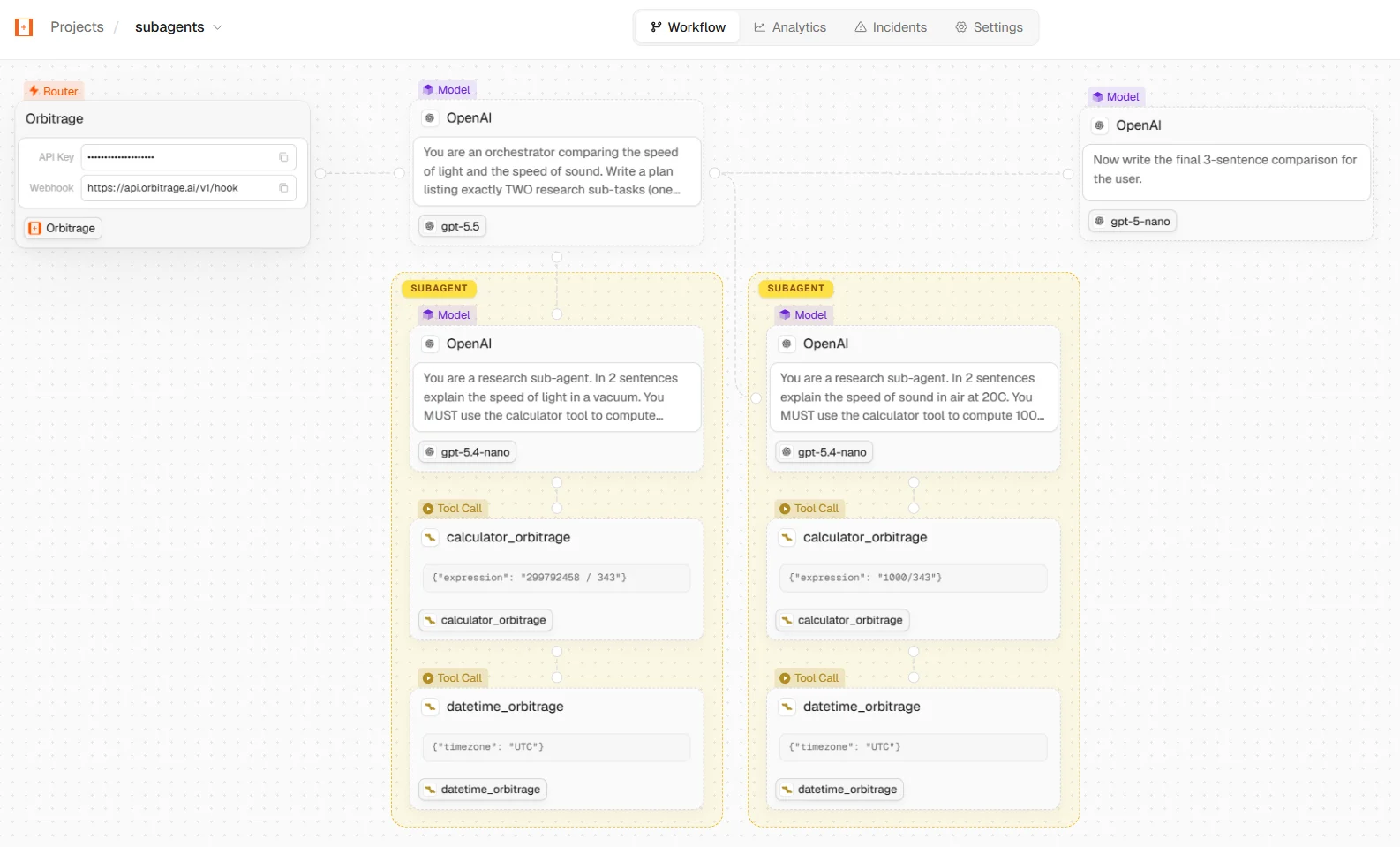
Open [app.orbitrage.ai/workflows](https://app.orbitrage.ai/workflows) — your
call appears with the model, provider, tokens, cost, latency, and (for
multi-step agents) the full run graph, all attributed to `customer_42`.
 ## Picking a model
| You write | What happens |
| --------------------------- | ---------------------------------------------------------------------------------------------------------------------- |
| `model="glm-5.2"` | Pinned — strong general model with a 1M context. Predictable; great for tools + quality. |
| `model="minimax-m3"` | Pinned — fast and cheap. A great default for high volume. |
| `model="gpt-oss-20b"` | Pinned — small, cheap, reliable tool-calling. |
| `model="auto"` | **Auto routing** — Orbitrage scores the prompt and picks the cheapest capable model. See [Routing](/concepts/routing). |
| `model="claude-sonnet-4-6"` | Pinned to a **frontier** model. Needs your own Anthropic key — see below. |
Start with a **direct model** while you build, then switch to `model="auto"`
once you want Orbitrage to optimize cost for you. With `auto`, give reasoning
models room — set `max_tokens` ≥ 512 so the answer isn't truncated by the
model's internal reasoning budget.
### Frontier models need your own key
Every open-weight model above runs on Orbitrage's infrastructure and bills to your
credits. The closed frontier lines — `claude-*`, `gpt-*` (except `gpt-oss-*`),
`gemini-*` and `grok-*` — are **BYOK-only**: save and enable a key for that vendor
on the [Models page](https://app.orbitrage.ai/models), and the call goes straight
to the provider on your key while Orbitrage charges **\$0** for the tokens.
Call one without an enabled key and you get a clear error instead of a surprise
bill — Orbitrage never silently falls back to pooled inference:
```json theme={null}
{
"error": {
"message": "claude-sonnet-4-6 is a bring-your-own-key model. Add and enable an Anthropic key on the Models page to use it.",
"type": "permission_error",
"code": "byok_key_required",
"requested_model": "claude-sonnet-4-6",
"provider": "anthropic"
}
}
```
`model="auto"` never produces this error — it only routes to models your
organization can actually reach. See [BYOK](/concepts/byok).
## Attributing every call to a user
`user_id` is the single most useful thing to get right — it unlocks per-user
analytics. Set it once for a script, or switch it per request in a server.
```python Python theme={null}
# One user for the whole process:
orbitrage.init(api_key, user_id=current_user.id)
# Or switch per request in a long-running server — then build a NEW client
# (already-constructed clients have copied their headers):
orbitrage.set_user(current_user.id)
client = OpenAI()
```
```typescript Node.js theme={null}
// One user for the whole process:
await orbitrage.init({ apiKey, userId: currentUser.id });
// Or switch per request — then build a NEW client:
orbitrage.setUser(currentUser.id);
const client = new OpenAI();
```
See [Per-user attribution](/examples/per-user-attribution) for the server pattern.
## Already using a framework?
LangChain, LangGraph, CrewAI, Agno, LlamaIndex, and the Vercel AI SDK all use an
OpenAI-compatible client under the hood — point them at the gateway and you get
the same routing + tracing. Copy-paste setups:
## Next steps
Client tools + hosted **managed tools** (web search, scrape, calculator) — no keys to wire.
Token-by-token streaming, fully traced.
How `auto` scores prompts and picks models.
The full catalog of direct model names.
## Picking a model
| You write | What happens |
| --------------------------- | ---------------------------------------------------------------------------------------------------------------------- |
| `model="glm-5.2"` | Pinned — strong general model with a 1M context. Predictable; great for tools + quality. |
| `model="minimax-m3"` | Pinned — fast and cheap. A great default for high volume. |
| `model="gpt-oss-20b"` | Pinned — small, cheap, reliable tool-calling. |
| `model="auto"` | **Auto routing** — Orbitrage scores the prompt and picks the cheapest capable model. See [Routing](/concepts/routing). |
| `model="claude-sonnet-4-6"` | Pinned to a **frontier** model. Needs your own Anthropic key — see below. |
Start with a **direct model** while you build, then switch to `model="auto"`
once you want Orbitrage to optimize cost for you. With `auto`, give reasoning
models room — set `max_tokens` ≥ 512 so the answer isn't truncated by the
model's internal reasoning budget.
### Frontier models need your own key
Every open-weight model above runs on Orbitrage's infrastructure and bills to your
credits. The closed frontier lines — `claude-*`, `gpt-*` (except `gpt-oss-*`),
`gemini-*` and `grok-*` — are **BYOK-only**: save and enable a key for that vendor
on the [Models page](https://app.orbitrage.ai/models), and the call goes straight
to the provider on your key while Orbitrage charges **\$0** for the tokens.
Call one without an enabled key and you get a clear error instead of a surprise
bill — Orbitrage never silently falls back to pooled inference:
```json theme={null}
{
"error": {
"message": "claude-sonnet-4-6 is a bring-your-own-key model. Add and enable an Anthropic key on the Models page to use it.",
"type": "permission_error",
"code": "byok_key_required",
"requested_model": "claude-sonnet-4-6",
"provider": "anthropic"
}
}
```
`model="auto"` never produces this error — it only routes to models your
organization can actually reach. See [BYOK](/concepts/byok).
## Attributing every call to a user
`user_id` is the single most useful thing to get right — it unlocks per-user
analytics. Set it once for a script, or switch it per request in a server.
```python Python theme={null}
# One user for the whole process:
orbitrage.init(api_key, user_id=current_user.id)
# Or switch per request in a long-running server — then build a NEW client
# (already-constructed clients have copied their headers):
orbitrage.set_user(current_user.id)
client = OpenAI()
```
```typescript Node.js theme={null}
// One user for the whole process:
await orbitrage.init({ apiKey, userId: currentUser.id });
// Or switch per request — then build a NEW client:
orbitrage.setUser(currentUser.id);
const client = new OpenAI();
```
See [Per-user attribution](/examples/per-user-attribution) for the server pattern.
## Already using a framework?
LangChain, LangGraph, CrewAI, Agno, LlamaIndex, and the Vercel AI SDK all use an
OpenAI-compatible client under the hood — point them at the gateway and you get
the same routing + tracing. Copy-paste setups:
## Next steps
Client tools + hosted **managed tools** (web search, scrape, calculator) — no keys to wire.
Token-by-token streaming, fully traced.
How `auto` scores prompts and picks models.
The full catalog of direct model names.