

Three layers, increasing depth
Insights
Always-on. Ranked anomalies across cost, latency, errors, and refusals — each
with a cause hypothesis and a confidence score.
Trajectory
On drill-down. Reconstructs the actual run graph: which node broke first and
how the failure propagated downstream.
Explain
On click. An LLM reads the computed facts and writes a short narrative with a
recommended fix. Cached, so idle costs nothing.
What the detectors measure
Each metric uses the statistically appropriate test, not a one-size-fits-all threshold. You don’t need the math to read the dashboard:
Baselines are computed per hour-of-week, so a Tuesday-3pm spike is judged
against past Tuesday 3pms — not a flat weekly average.
Severity
Findings are graded by significance and effect size and sample size:- Critical — strong evidence, large effect, enough data.
- Warning — significant but smaller or less certain.
- Info — borderline or low-sample; worth a glance.
Root-cause trajectories
Click a finding to open its trajectory. Orbitrage reconstructs the execution graph of the affected runs — linking parent calls to child calls by explicit trace ids, and, where those are missing, by content overlap between one call’s output and the next call’s input. From that graph it computes:- First broken node — the earliest step whose outcome was a failure, timeout, empty response, or refusal.
- Propagation path — the downstream steps that degraded because of it.
- Bottleneck — the step on the critical path that ate the most time.
- Recovery rate — how many affected runs the fallback chain saved.
- Impact — affected sessions, wasted cost, and extra retries, summed exactly from the data.
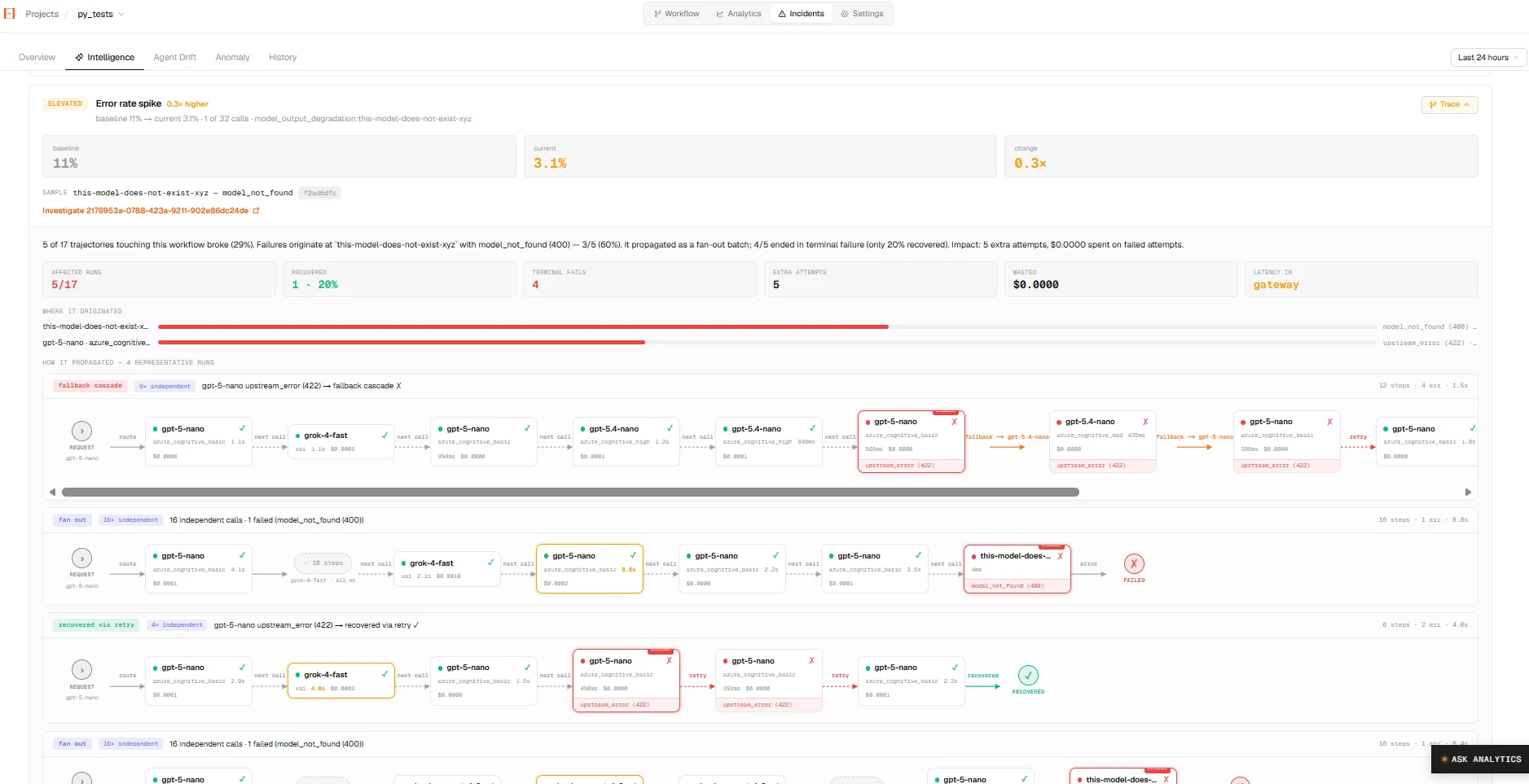
The Intelligence tab — a finding with its reconstructed propagation graph: the originating node ringed red, the path it cascaded down, and where routing recovered.
Explain (the LLM narrative)
The Explain button asks a model (routed through Orbitrage itself) to turn the already-computed facts into a short narrative and a recommended action — for example:The Research node (Because it only runs on click and is cached (~30 min), an idle dashboard spends zero LLM tokens on explanations.claude-sonnet) is timing out on 61% of requests since 14:00 — a provider-side regression. The downstream Writer then gets empty context and refuses. Routing recovers 70% via fallback togpt-oss-20b, but 38 runs still fail. Fix: route Research to a faster model; check the provider’s status page.
Where it shows up
- The Intelligence tab in a workflow surfaces live findings and trajectories.
- The Overview page shows org-wide anomalies and incident KPIs.
- The Ask Analytics assistant can run the same anomaly
detection on demand (
detect_anomalies,node_drift). - Anomaly alerts push breaches to Slack automatically.
The Intelligence layer is descriptive — it tells you what is happening and
why, with exact numbers. It does not auto-remediate; recommendations are
advisory.