

tavily_orbitrage) in your normal tools=[…] array — Orbitrage runs it with our
pooled key, feeds the result back to the model, and returns the final answer. You pay
per call (provider price + the standard 2.5% platform fee). Your own tools always run
on your side, untouched.
How it works
1
Enable + allow-list
On the Tools Gateway page, turn the
feature on and check the managed tools you want to allow.
2
Reference the tool by name
Add the reserved name to your request’s
tools array — in pure OpenAI format.
No key, no setup.3
We run it, you get the answer
When the model calls a managed tool, Orbitrage executes it (with our key), appends
the result, and re-invokes the model until it produces a final answer — all in one
request. We bill the call to your credit balance.
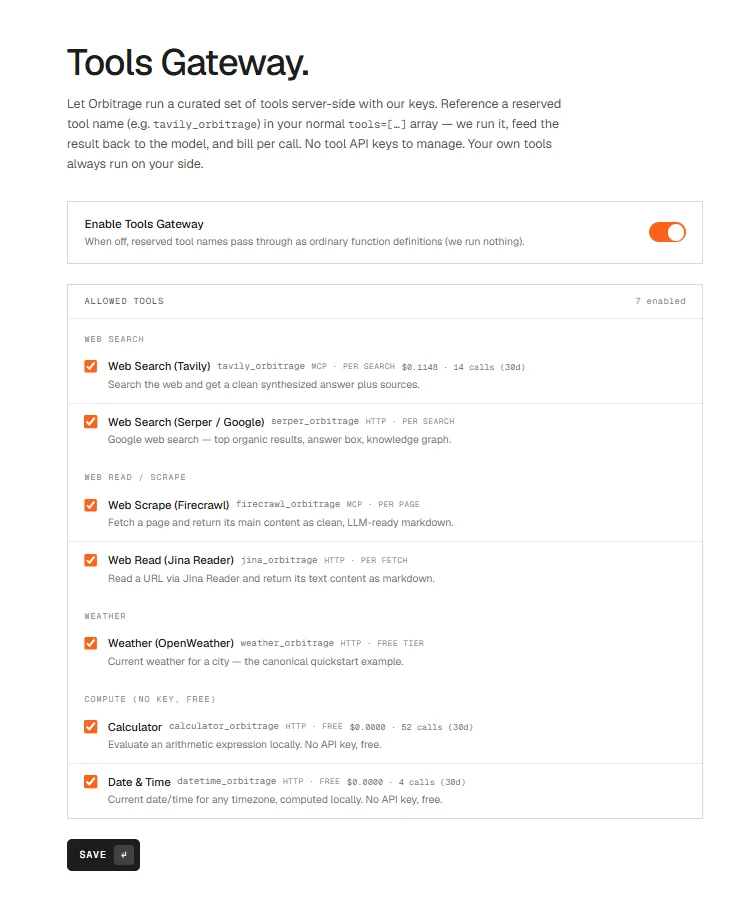
The Tools Gateway settings — enable the feature and allow-list exactly the managed tools you want, each with its per-call price.
Available tools
Rich tools (Tavily, Firecrawl) run through the vendor’s hosted MCP server with our
key injected — so the model’s tool calls are executed and billed by us, and it works for
every model you route to, not just MCP-aware ones. Your key never leaves our backend.
The whole tool catalog, by name
Beyond the named tools above,monid_find_orbitrage + monid_run_orbitrage reach a
catalog of ~1,300 third-party tools (web search, scraping, people/company data, media
generation, on-chain, weather, news, and more) — all executed with Orbitrage’s pooled
account, no signup or keys on your side. The model discovers the right tool by description
(monid_find_orbitrage) then runs it (monid_run_orbitrage) — long-running tools are
polled to completion transparently. These are metered: you’re billed the tool’s
actual per-call cost (which varies per tool) plus the standard markup — nothing when a
tool completes but returns no data. A per-call cost ceiling protects against runaway spend.
Usage
Just list the tool name — Orbitrage expands it to the full definition for you. This is the whole point: zero boilerplate.The SDK doesn’t matter — Orbitrage works through any OpenAI-compatible client because the
gateway recognizes the reserved name on the wire.
One example per managed tool
Each is a one-liner — just name the tool. (Get the7006652 answer, a real
forecast, live search results, scraped markdown, etc., looped back automatically.)
tools=[...] array — the model picks which to call,
Orbitrage runs each server-side, and you get one final answer.
Customizing + mixing with your own tools
Prefer the full OpenAI tool object? It still works — pass a normalfunction tool and we’ll
use your schema. Your own tools sit right alongside managed ones and always run on your side:
Managed vs. your own tools
- Managed (
*_orbitrage, allow-listed): we run them, loop until a final answer, and bill per call. The dashboard flags each one via Orbitrage with its cost. - Your tools: if the model calls one of your own functions, we hand that turn straight back to you to execute — exactly like a normal tool call. If a single turn mixes both, we return it for you to handle.
Billing + tracking
Each managed call is billed at the provider’s price + 2.5% and folded into the request’scost_usd, so it debits your credits like any other usage.
This holds on a BYOK turn too. The frontier model’s tokens are billed
by your provider and cost $0 in Orbitrage credits — but managed tools run on our
pooled tool keys, so they still bill. A BYOK turn that used managed tools costs exactly
the tool cost.
routing_steps (tool_calls_cost_usd, managed_tools, managed_tool_calls) and rolled up
by the org_tool_spend analytics function. Streaming requests emit
scaleasap.tool_call / scaleasap.tool_result progress events while the tools run.