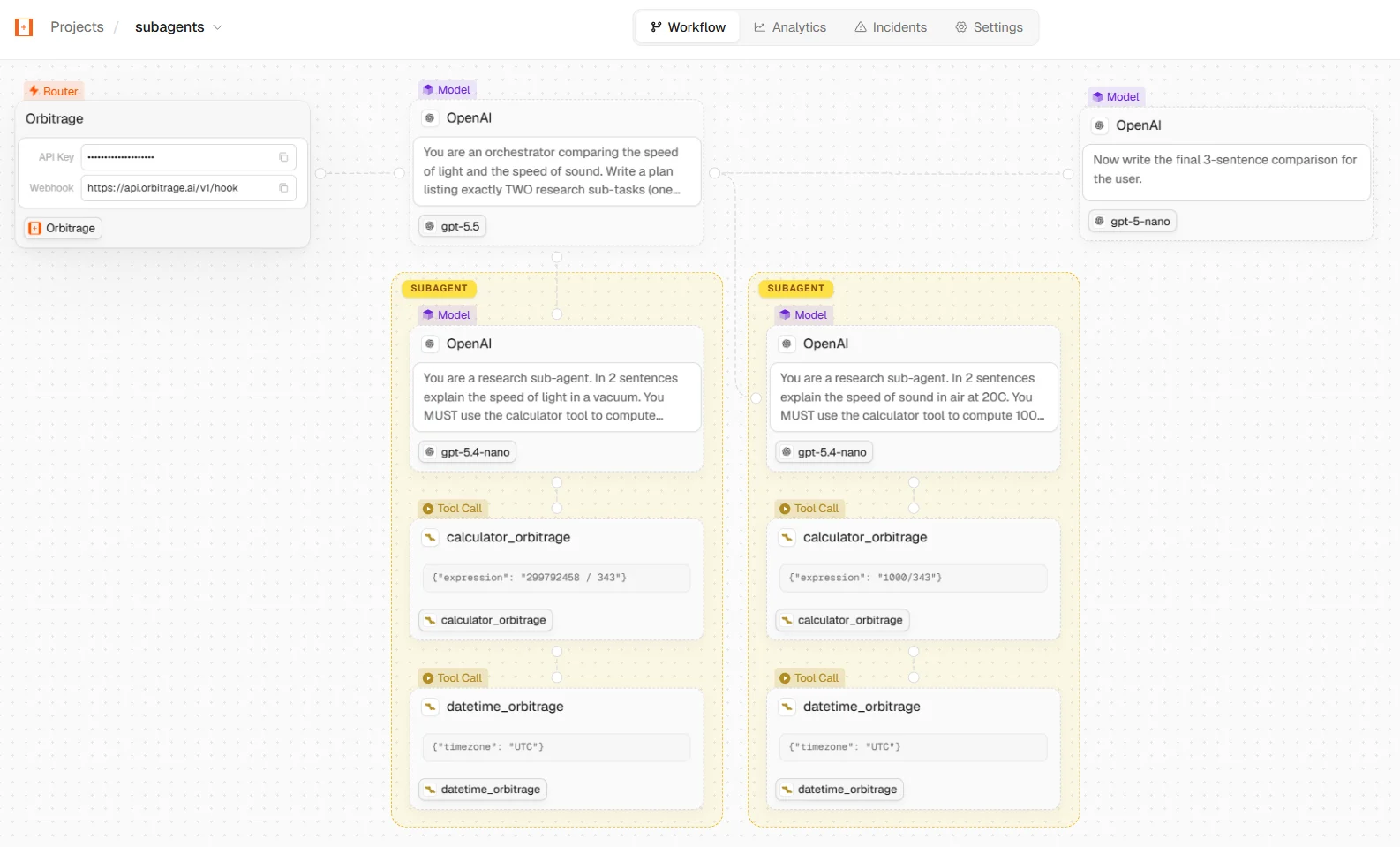
Route + trace your first LLM call through Orbitrage in under two minutes.
Orbitrage is the convenience layer for LLM apps: point your existing OpenAI (or
Anthropic) client at our gateway and every call is routed to the best model
and traced in your dashboard — cost, tokens, latency, tools, and the full
run graph. No SDK rewrite, no OpenTelemetry.
1
Install the latest SDK
The SDK is a thin header-injector; openai is the only peer you need
(Orbitrage speaks OpenAI format).
pip install -U orbitrage openai
npm install orbitrage@latest openai
2
Initialize with your key — and a user id
Call init()once, at the top of your program. Always pass a
user_id so every call is attributed to the end-user who triggered it —
this is what powers per-user cost, usage, and analytics in the dashboard.
import os, orbitrageorbitrage.init( os.environ["ORBITRAGE_API_KEY"], user_id="customer_42", # attribute calls to THIS end-user)
import { orbitrage } from "orbitrage";await orbitrage.init({ apiKey: process.env.ORBITRAGE_API_KEY, userId: "customer_42", // attribute calls to THIS end-user});
Get your orb_ key from app.orbitrage.ai →
API Keys. The SDK points your client at https://api.orbitrage.ai/v1
and injects the key for you — even if you already have OPENAI_API_KEY set.
3
Make a call — pick a model, or let Orbitrage route
Use the OpenAI client exactly as you always have. Name a direct model
(recommended while you build — predictable behavior), or use model="auto"
to let Orbitrage route to the cheapest capable model.
from openai import OpenAIclient = OpenAI() # base_url + key set for youresp = client.chat.completions.create( model="glm-5.2", # direct model — try "minimax-m3" for speed/cost messages=[{"role": "user", "content": "Write a haiku about routing."}],)print(resp.choices[0].message.content)
import OpenAI from "openai";const client = new OpenAI(); // baseURL + key set for youconst resp = await client.chat.completions.create({ model: "glm-5.2", // direct model — try "minimax-m3" for speed/cost messages: [{ role: "user", content: "Write a haiku about routing." }],});console.log(resp.choices[0].message.content);
Open app.orbitrage.ai/workflows — your
call appears with the model, provider, tokens, cost, latency, and (for
multi-step agents) the full run graph, all attributed to customer_42.
Each run is reconstructed node-by-node — LLM calls, sub-agents, and managed tools.
Pinned — strong general model with a 1M context. Predictable; great for tools + quality.
model="minimax-m3"
Pinned — fast and cheap. A great default for high volume.
model="gpt-oss-20b"
Pinned — small, cheap, reliable tool-calling.
model="auto"
Auto routing — Orbitrage scores the prompt and picks the cheapest capable model. See Routing.
model="claude-sonnet-4-6"
Pinned to a frontier model. Needs your own Anthropic key — see below.
Start with a direct model while you build, then switch to model="auto"
once you want Orbitrage to optimize cost for you. With auto, give reasoning
models room — set max_tokens ≥ 512 so the answer isn’t truncated by the
model’s internal reasoning budget.
Every open-weight model above runs on Orbitrage’s infrastructure and bills to your
credits. The closed frontier lines — claude-*, gpt-* (except gpt-oss-*),
gemini-* and grok-* — are BYOK-only: save and enable a key for that vendor
on the Models page, and the call goes straight
to the provider on your key while Orbitrage charges $0 for the tokens.Call one without an enabled key and you get a clear error instead of a surprise
bill — Orbitrage never silently falls back to pooled inference:
{ "error": { "message": "claude-sonnet-4-6 is a bring-your-own-key model. Add and enable an Anthropic key on the Models page to use it.", "type": "permission_error", "code": "byok_key_required", "requested_model": "claude-sonnet-4-6", "provider": "anthropic" }}
model="auto" never produces this error — it only routes to models your
organization can actually reach. See BYOK.
user_id is the single most useful thing to get right — it unlocks per-user
analytics. Set it once for a script, or switch it per request in a server.
# One user for the whole process:orbitrage.init(api_key, user_id=current_user.id)# Or switch per request in a long-running server — then build a NEW client# (already-constructed clients have copied their headers):orbitrage.set_user(current_user.id)client = OpenAI()
// One user for the whole process:await orbitrage.init({ apiKey, userId: currentUser.id });// Or switch per request — then build a NEW client:orbitrage.setUser(currentUser.id);const client = new OpenAI();
LangChain, LangGraph, CrewAI, Agno, LlamaIndex, and the Vercel AI SDK all use an
OpenAI-compatible client under the hood — point them at the gateway and you get
the same routing + tracing. Copy-paste setups: